


In the last few years, as I’ve spent time building Python and Go services and APIs, I’ve found that in almost every single project, there was this one small case that didn’t exactly fit our current scope. We often thought, “if only we could cover that, then it would solve a major pain point”.
So it usually ends up as some script to sync data between the databases, a background job that calls a slow API and updates the records, or a cronjob calculating statistics for an analytical dashboard.
And if it stays that way, and just works, and no one needs to touch it ever again - that’s amazing. But more often than not, that’s not the reality. Some time passes, and suddenly we have multiple scripts that got a lot longer, a whole range of background jobs, or multiple crons running multiple things multiple times a day, the pipelines and queues, working asynchronously and talking to each other. Tracking all of that becomes difficult and messy. At that point, we’ve a need for an orchestration tool to help control the chaos. We need to add observability and reliability to already written code and already established processes.
Temporal and Prefect are orchestration solutions that are developer-centric and built around the code-first approach. The logic and code you write are the most important parts, and they’re there to improve your experience by handling the retries, scheduling, monitoring, and reducing the overall boilerplate.
To get a feel for how it is to work with both of these tools, I implemented the same simple file-processing pipeline in both of them using Python: a file is uploaded by a user, saved on the machine’s disk, and then both Temporal’s and Prefect’s workflows are triggered to handle the new file.
Workflow’s job is to:
-
read the file and detect its type,
-
place it in the appropriate cloud storage container (in our case, Amazon AWS S3 bucket),
-
insert a record representing the file and its S3 location into the database,
-
and then, depending on the file type, run either:
- text recognition,
- image analysis,
- or audio transcription,
-
update our record with the extracted data, delete the original file, and send a notification to confirm that the new file is available.
async def process_file(file_path: str) -> dict:
    file = await read_local_file(file_path=file_path)

    s3_path = await upload_file(file=file)
    file.s3_path = s3_path

    uuid = await db_insert_file(file=file)
    file.uuid = uuid

    match file.type:
        case "document":
            file.description = await recognize_text(data=file.content)
        case "image":
            file.description = await analyze_image(data=file.content)
        case "audio":
            file.description = await transcribe_audio(data=file.content)

    file.state = "done"
    await db_update_file(file=file)
    await delete_local_file(file_path=file_path)

    notification = Notification(
        recipients=RECIPIENTS,
        message=f"Processed {file.name} ({file.type}) - db: {file.uuid}, s3: {file.s3_path}",
    )
    await send_notification(notification=notification)

    return {"file": file.name, "size": file.size, "id": file.uuid, "location": file.s3_path}
In the snippet above, you can see the plain Python code for my workflow. It’s a simple and straightforward process to implement, and both orchestrators can cover far more advanced scenarios.
The goal of this approach is not to build a production-ready system or benchmark anything, but to evaluate the developer experience - how both orchestrators handle multiple I/O steps, error recovery, external services coordination, and the overall workflow of a typical developer task. Let’s try to orchestrate this flow using both of the mentioned solutions.
Temporal - writing code that never fails
Temporal markets itself as a solution that will allow you to write code as if failures didn’t exist. No matter if it’s an API error, network outage, service crash, or something else, Temporal acts as another layer on top of your code that persists every event in the workflow’s execution history, and can recover and continue from where it left off.
Temporal’s architecture
Starting to develop locally takes minutes. There are official SDKs for most of the popular programming languages, so no matter which one your team works in daily, it’s probably supported. Additionally, every one of them is covered by the documentation in detail. It made getting into Temporal and understanding how to work with it really easy, as it covers not only the quickstart and minimal guide, but also all of the features, how they work, how to implement them, and gives a multitude of practical examples - from the most basic ones to advanced concepts in each of the languages.
Underneath, Temporal implements a chain:
Client/Schedule -> Task Queue -> Worker -> Workflow code -> Activity executions
Client or schedule is a trigger that begins the whole process, it calls the Temporal server with the workflow we wish to execute and the arguments to be passed. This call places work in a queue, and one of the multiple running workers polling that queue will pick it up and start our workflow. Workflow is code that contains our business logic, which is later handled through activities. Each activity is a function that fulfills a single task in our pipeline.
In our showcase, we have a Temporal server and workers running, then when a new file is uploaded, a call is made to notify us. This starts a “process new file” workflow that consists of multiple activities like “read file”, “upload file to S3”, “run text recognition on the file”, and so on.
Below you can see parts of the previous code altered to use Temporal’s features, both in the minimal case and also with additional configuration. By using Temporal’s decorators and methods, we make our process into a workflow and our functions into activities.
Part of a minimal Temporal workflow code:
@activity.defn
async def read_local_file(file_path: str) -> File:
    return await storage_client.read(file_path=file_path)


@activity.defn
async def upload_file(file: File) -> str:
    s3_path = await s3_client.upload(file=file)
    return s3_path

@workflow.defn
class FileProcessingWorkflow:
    @workflow.run
    async def run(self, file_path: str) -> dict:
        file = await workflow.execute_activity(
            activity=read_local_file,
            arg=file_path,
            schedule_to_close_timeout=timedelta(seconds=10)
        )

        s3_path = await workflow.execute_activity(
            activity=upload_file,
            arg=file,
            schedule_to_close_timeout=timedelta(seconds=30),
        )
        file.s3_path = s3_path

(...)
Temporal activity called with additional policies configuration:
  s3_path = await workflow.execute_activity(
            activity=upload_file,
            arg=file,
            task_queue="io-queue",
            schedule_to_close_timeout=timedelta(seconds=30),
            heartbeat_timeout=timedelta(seconds=5),
            retry_policy=RetryPolicy(
                initial_interval=timedelta(seconds=5),
                backoff_coefficient=2.0,
                maximum_interval=timedelta(seconds=30),
                maximum_attempts=5,
            ),
            summary="Uploads given file to appropriate S3 bucket"
        )
Configurable policies and Nexus
Definitions for activities can be very minimal, allowing focus on the logic of the process, and then expanded and configured depending on our needs. To ensure reliability, Temporal automatically retries failed activities with a backoff by default. However, the policies for activities are entirely configurable with timeouts and heartbeats, so a long-running task periodically confirms it’s still running - and if not or if it’s taking too long the whole activity it gets restarted. Activities can also emit metrics, so you can integrate with Prometheus, Grafana, or other visibility stacks.
Workflows, on the other hand, define how activities connect and interact with one another. They support queries for reading the workflow state, signals to send asynchronous input or commands, and updates for live, confirmed modifications for already running workflows. This allows us to change the direction of the already running workflow, condition external processes on the workflows, or build workflows depending on other workflows. With the Temporal Nexus, we can even connect our workflows across other Temporal instances, allowing for cross-team workflow dependencies.
Finally, Temporal provides a local testing environment, also covered by the docs. It allows for workflows to be run deterministically, without a live server. That makes it easy to validate workflow logic, simulate issues, or even replay past executions when changing the code.
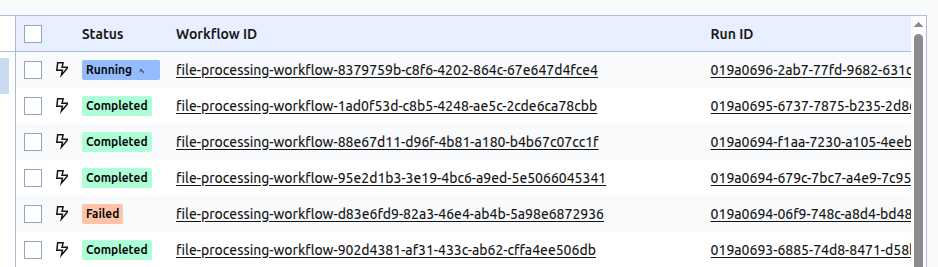
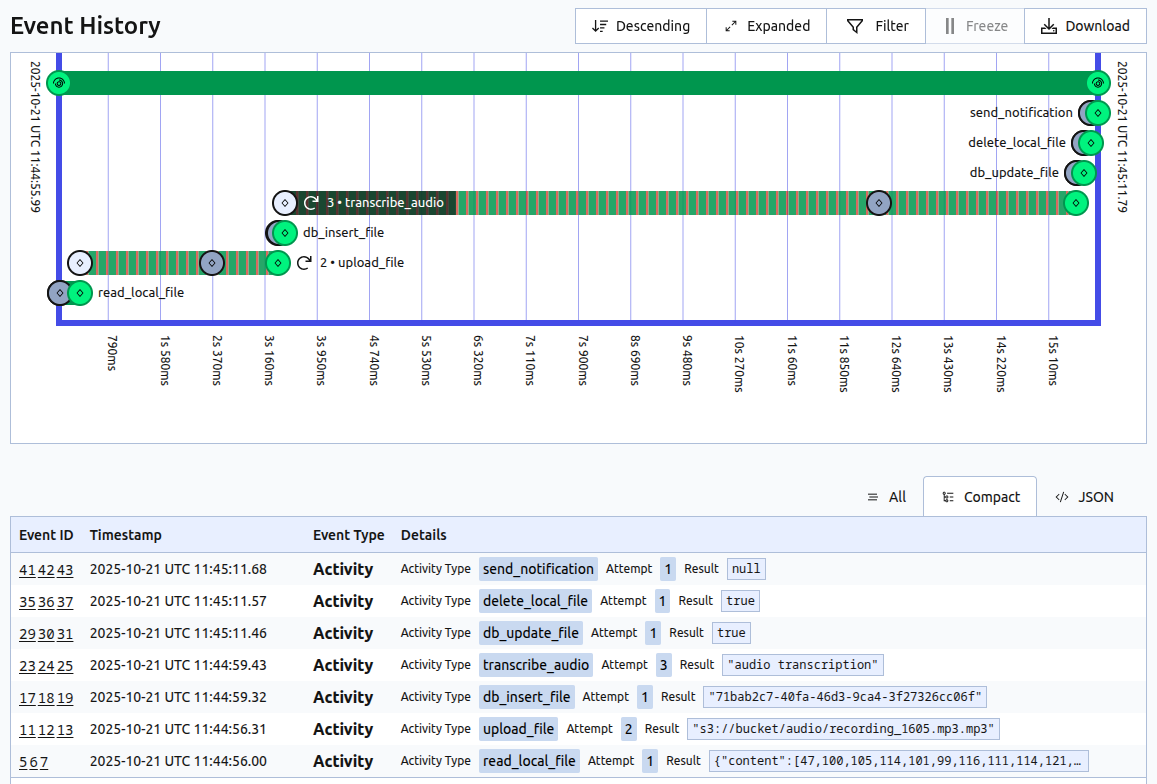
All of that brought together makes a very robust and resilient system. With the addition of a simple and straightforward UI, which allows for easy inspection of each workflow and activity, it ends up feeling natural to work with, especially from a developer’s perspective.
Prefect – maximum visibility for Python code
Prefect approaches the problem from a different angle. It is a developer-focused solution, but with a Python-native philosophy. It's designed for observability and flexibility, not pure reliability, allowing you to monitor and coordinate your existing code without rewriting it to fit the framework. It is especially popular for data pipelines, ML, and AI workflows than generic orchestrations – it easily extends to any orchestration case.
More about Prefect’s architecture
Starting with Prefect is even quicker. Assuming your existing Python code is well structured, then all you need is to install the package, start the Prefect server locally, and decorate your code with two of Prefect’s decorators.
Underneath it implements its own chain:
Deployment -> Work Pool -> Worker -> Flow code -> Task executions.
Deployment defines how and when a flow should run – including its schedule, parameters, and the work pool to use. Work pools describe the infrastructure where flow runs will execute, and workers are processes that poll the work pools and actually make the flows run. And flow defines the overall process for our workflow and its logic, and each step that will be initiated. Then each step in the process is represented by a task, but it can also be another flow – a subflow.
In Prefect we have a very similar showcase setup as for Temporal before - when a new file is uploaded, a flow run is triggered to process it, consisting of multiple tasks such as reading, uploading, analyzing, and notifying.
Below you can see how the previous code compares to be used with Prefect’s decorators instead.
A part of a minimal Prefect flow code:
@task
async def read_local_file(file_path: str) -> File:
    return await storage_client.read(file_path=file_path)


@task
async def upload_file(file: File) -> str:
    return await s3_client.upload(file=file)


async def process_file(file_path: str) -> dict:
    file = await read_local_file(file_path=file_path)

    s3_path = await upload_file(file=file)
    file.s3_path = s3_path

(...)
Prefect task declared with additional policies configuration:
@task(
    name="s3-upload",
    description="Upload given file to appropriate S3 bucket",
    version="0.1",
    timeout_seconds=30,
    cache_policy=cache_policies.NO_CACHE,
    retries=3,
    retry_delay_seconds=10,
    on_failure=[notify_failure]
)
async def upload_file(file: File) -> str:
    return await s3_client.upload(file=file)
Work pools – controlling where the code runs
Same as with the previous solution, the tasks and flows in Prefect can be very minimal - just add the decorators, have a server running, and that is enough to get the observability for our process. Each task can individually define its retry policy, timeout, caching, and even concurrency rules. Unlike Temporal, where these are often implicit defaults, Prefect gives full control, but is aimed for observability and ease of integration. There’s also a wide range of extensions available for AWS, GCP, Azure, Slack, Discord, Teams, and more.
Additionally Prefect has an extra layer that makes it stand out - work pools. While deployments define how and when a flow should run, and workers handle the execution, so therefore have similar functionality to what can be achieved in Temporal. Work pools then define where the work should run. It can specify to use a local process, Docker container, Kubernetes cluster, remote VMs…
While Temporal also does scale horizontally by adding more workers for queues, Prefect’s work pools consider infrastructure as a core concept, allowing control to run flows on multiple, different backends and environments.
For example:
- if we’re just calling APIs, we can run on any machine,
- if we have to process terabytes of data, we can delegate to a subflow and run it on a separate machine to avoid blocking the general resources,
- if we have to train an AI model, we can delegate to a machine with a powerful GPU, while keeping generic tasks on a lighter infrastructure.
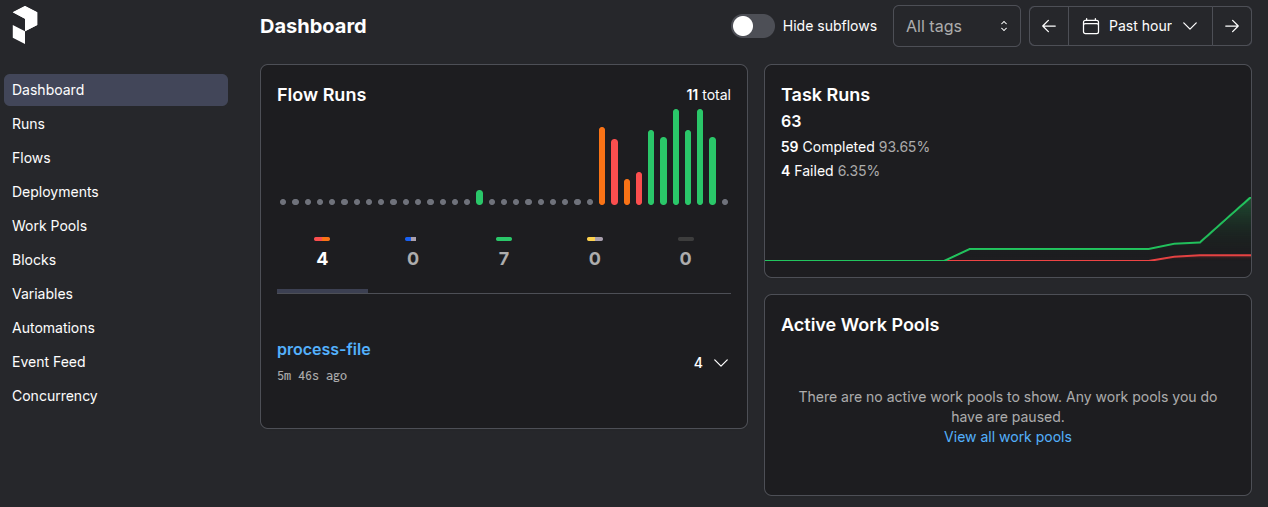
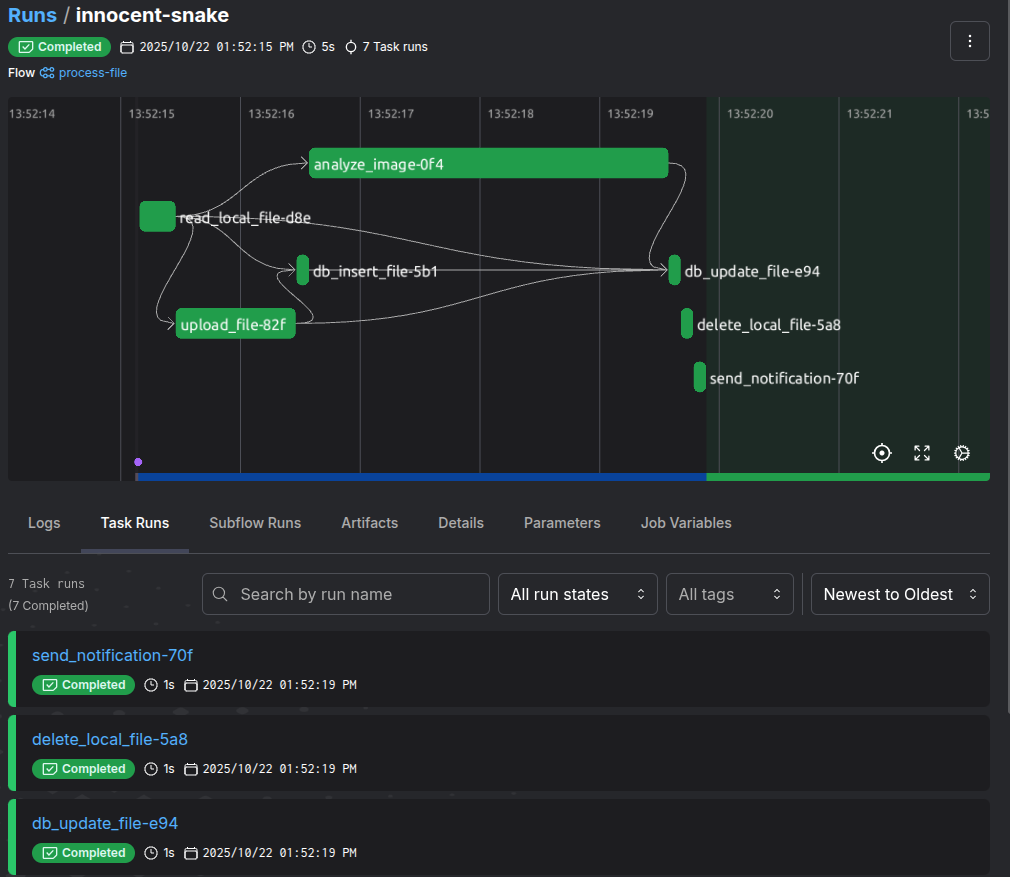
Additionally, the UI provides both a dashboard for general overview and real-time details of all flows and tasks, making a tool that’s clearly focused on observability first. However, the feature that stands out the most is how painlessly it integrates with your Python code.
Conclusions
Ultimately, both solutions bring order to the chaos of distributed processing, but with different approaches.
Temporal supports multiple programming languages and is built around reliability. Its goal is to make sure that no matter what issue comes up elsewhere, your workflow will still run. It excels in environments where the main focus is durability and consistency, and long-running business processes spanning through multiple teams and multiple code bases.
Prefect is rooted in Python. It’s designed for observability and seamless integration with existing code and infrastructure. It is most useful for data pipelines, machine learning workflows, automations, and other scenarios where observability and flexibility are the keys.
| Feature | Temporal | Prefect |
|---|---|---|
| Philosophy | Reliability, consistency | Observability, flexibility |
| Use cases | Long-running business processes, multi-service systems | Data pipelines, ML workflows, automation |
| Languages | Multilanguage | Python only |
| Resilience | Automatic retires, persisted state, heartbeats, enforced determinism | Retry policies optional, no built-in determinism |
| Execution | Identical workers polling task queues | Multiple work pools which map to environments and infrastructure |
| Scaling | Horizontal scaling with additional workers | Flexible scaling and prioritization using work pools |
| State | Workflow state is durable and replayable | Workflow state is observed |
| Integrations | SDKs in multiple languages | Extensive support for external services integrations |
In the end, Temporal feels like it can be a framework for a multilanguage system that must never fail, while Prefect allows you to look into and gather insight about everything that’s happening in your Python workflows.
And thus, as it so often goes, neither is a better solution. Both are great at what they aim to achieve, but which one would be a better fit for your needs vastly depends on the project, the team, and your end goals.