


From gaps to implementation: a practical security model for MCP servers
Securing MCP servers in network automation environments requires more than standard API authentication patterns. The tool-invocation model introduces identity and authorization gaps that do not exist in conventional REST APIs… and the consequences of getting it wrong include unauthenticated agents executing configuration changes on live infrastructure.
Part 1 explained why the Model Context Protocol (MCP) introduces new risks when used for infrastructure automation. MCP allows AI agents to dynamically discover and invoke tools exposed by servers. If identity and authorization are not enforced at the MCP server boundary, any client capable of reaching the server may be able to discover tools and attempt operations.
This post moves from the problem to a practical implementation. It shows a security model for the MCP server layer where every request is authenticated, permissions are represented as scopes, scopes are bundled into roles, and authorization is enforced both when tools are listed and when tool calls are executed.
This article covers four steps:
- JWT authentication at the MCP server boundary
- Per-tool scope enforcement at call time
- Discovery time filtering of the tools list
- Where scope-based access control breaks down
One boundary is out of scope: how MCP servers authenticate to network devices and how device-side policy is enforced. For simplicity, we assume each MCP server uses a shared service account with broad device permissions. In Part 3, we will return to this topic and discuss identity propagation and least-privilege enforcement on the device side.
The Net-Inspector demo environment and its attack surface
Before diving into specific controls, this section defines the system we want to secure and the trust boundaries between its components. Figure 1 shows the system architecture.
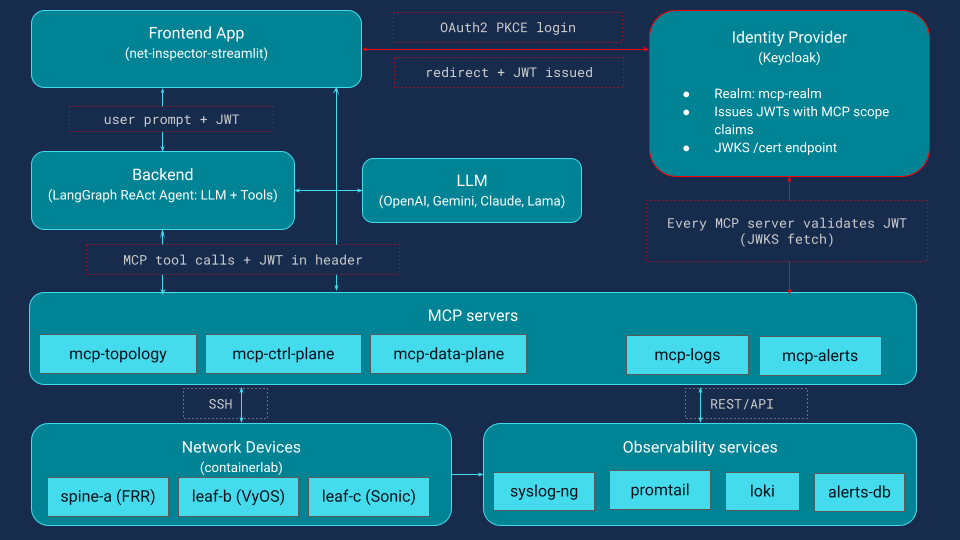
Net-Inspector is a Streamlit application with two modes. The dashboard calls MCP tools directly to show live topology, node and link details, logs, and alerts. The chat interface lets engineers ask questions in natural language. In both modes, user identity must reach the MCP servers so they can enforce tool permissions.
How the AI agent interacts with MCP servers
The AI agent is a LangGraph ReAct agent. It receives a user question, discovers available tools from the MCP servers, and decides which tools to call. It can chain multiple calls across servers to answer a single question. Because the agent can explore and act, access control must be enforced at the MCP server boundary, not only in the client or the agent.
MCP server domains and risk levels
MCP servers expose tools organized by backend domain.
- mcp-topology provides network inventory and adjacency graph data
- mcp-ctrl-plane exposes control-plane state and configuration, such as BGP, IS-IS, and interfaces
- mcp-data-plane performs forwarding diagnostics such as ping, traceroute
- mcp-alerts provides a structured alert store
- mcp-logs exposes centralized logs backed by Loki
Across all five servers, the tool vocabulary is about 47 tools spanning read-only queries, active diagnostics, and configuration changes. The most sensitive MCP servers are mcp-ctrl-plane and mcp-data-plane because they interact with network devices.
What MCP servers need to be secure: a three-layer model
In the unprotected version of this system, MCP servers accept requests without verifying identity or enforcing tool permissions. Any client that can reach a server can discover tools and attempt tool calls. In order to secure the system, three conditions must hold:
- Authentication: every MCP request carries a verified identity
- Role mapping: each identity maps to a role with defined permissions
- Per tool scope enforcement: each tool declares required scope, enforced at tool list time and tool call time
Designing the authorization model: scopes, roles, and identity
The security model uses a common pattern borrowed from OAuth-based APIs. Permissions are represented as scope strings and roles bundle those scopes into meaningful access levels. The MCP servers define which scope strings exist. The identity provider decides which users receive those scopes.
Scope vocabulary: the mcp:: namespace
The scope namespace follows the pattern mcp:<server>:<action>. Three action levels cover the typical risk spectrum for network automation:
- read: represents non-mutating queries, such as retrieving interface status or routing tables
- probe: represents diagnostics that interact with the network but do not modify state, for example, ping or traceroute
- write: represents configuration changes such as modifying interfaces or pushing device configuration
Across the five MCP servers, the demo system defines 12 scope strings. Each scope represents the permission required to execute a particular category of tools.
| MCP server | read | probe | write |
|---|---|---|---|
| topology | mcp:topology:read | mcp:topology:write | |
| ctrl-plane | mcp:ctrl-plane:read | mcp:ctrl-plane:probe | mcp:ctrl-plane:write |
| data-plane | mcp:data-plane:read | mcp:data-plane:probe | mcp:data-plane:write |
| alerts | mcp:alerts:read | mcp:alerts:write | |
| logs | mcp:logs:read | mcp:logs:write |
Bundling scopes into roles for operational teams
Scopes are intentionally fine-grained, but assigning individual scope strings to users would be difficult to manage. Instead, scopes are grouped into roles. Three roles represent common network operations responsibilities: the net-viewer role provides read-only access across all servers, the net-operator role includes read permissions plus diagnostic probe capabilities, and the net-admin role includes read, probe, and write permissions.
| Scope | net-viewer | net-operator | net-admin |
|---|---|---|---|
| mcp:topology:read | x | x | x |
| mcp:ctrl-plane:read | x | x | x |
| mcp:data-plane:read | x | x | x |
| mcp:alerts:read | x | x | x |
| mcp:logs:read | x | x | x |
| mcp:ctrl-plane:probe | x | x | |
| mcp:data-plane:probe | x | x | |
| mcp:topology:write | x | ||
| mcp:ctrl-plane:write | x | ||
| mcp:data-plane:write | x | ||
| mcp:alerts:write | x | ||
| mcp:logs:write | x |
These roles reflect the typical structure of network operations teams and allow permissions to be managed at a higher level while preserving fine-grained scope checks in the MCP server.
Example users and their effective permissions
To demonstrate the model in action, the demo system defines three example users.
| User | Role | Effective scopes |
|---|---|---|
| alice | net-viewer | 5 read scopes — can browse topology, control plane, data plane, alerts, and logs |
| bob | net-operator | 7 scopes — everything alice has, plus ctrl-plane:probe and data-plane:probe |
| mark | net-admin | All 12 scopes — full read, probe, and write access to every MCP server |
Configuring Keycloak as the identity provider for MCP servers
Any OpenID Connect-compliant identity provider can support this model. In the demo environment, we use Keycloak. The configuration maps each scope string to a realm role, then bundles those roles into composite roles representing the three operational access levels.
When a user authenticates, the identity provider issues an access token containing their identity and the resolved scope list. In a typical deployment, the user authenticates through the Streamlit application using the OAuth Authorization Code flow. The client receives a short-lived access token and attaches it to every MCP request.
The MCP server acts as an OAuth resource server and validates the token before processing the request.
How the JWT maps to MCP tool permissions: a worked example
The resulting token contains all information required by the MCP server. Here is the token Keycloak issues when bob (net-operator) logs in:
{
  "iss": "https://keycloak:8080/realms/mcp-realm",
  "sub": "b2c3d4e5-...",
  "aud": "mcp-client",
  "exp": 1741200000,
  "preferred_username": "bob",
  "email": "bob@example.com",
  "net_role":"net-operator",
  "mcp_scopes":["mcp:topology:read", "mcp:ctrl-plane:read", "mcp:data-plane:read",
              "mcp:alerts:read", "mcp:logs:read",
              "mcp:ctrl-plane:probe", "mcp:data-plane:probe"]
  }
}
How the MCP server uses each part of the token
The MCP server uses different parts of this token for different purposes:
- JWT verification: iss, aud, and exp confirm the token was issued by the trusted IdP, intended for the correct client, and has not expired. The signature is verified against the provider’s public keys from the JWKS endpoint.
- Tool authorization: the mcp:* strings inside mcp_scopes are the resolved scopes. The MCP server extracts them and uses them to decide which tools bob can discover and which tool calls are allowed.
- Audit logging: preferred_username, email, and sub provide a human-readable and unique identity for tracking who did what.
- Device-level access: the net_role name net-operator is also present in the token. Part 3 of this series will show how this role maps to network device credentials, connecting MCP authorization to the actual SSH sessions on routers and switches.
JWT authentication at the MCP server boundary
Before an MCP server can decide what a user is allowed to do, it must confirm who the user is. Every request to the MCP server, including tools/list and tools/call, must contain a bearer token in the Authorization header. The MCP server validates the token locally using the identity provider’s public keys from the JWKS endpoint and checks the signature, expiry, issuer, and audience (Figure 2).
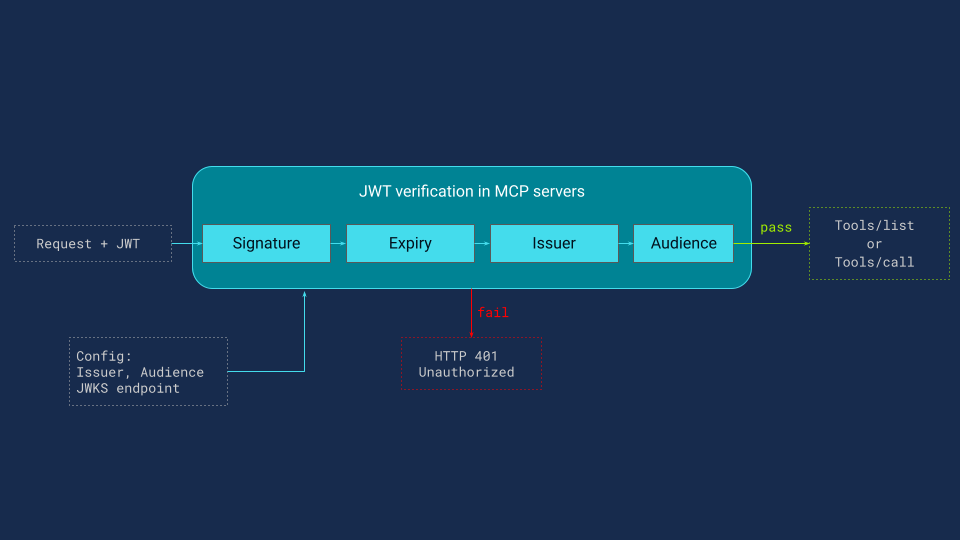
Requests with missing or invalid tokens are rejected with HTTP 401 before any tool code runs. JWT verification is local and usually has low overhead. The only network dependency is periodic JWKS refresh, which is cached by the MCP server. Authentication ensures that only authenticated users can interact with MCP servers.
Tool-level access control: enforcing scopes
Authorization is enforced by the MCP server at two points:
- Call time: can this user invoke this tool
- Discovery time: should this user, or his agent, see this tool in the tool list
Call-time authorization with the @require_scope decorator (FastMCP)
When developing an MCP server, using the FastMCP framework, each tool is registered with @mcp.tool(). To enforce authorization, we apply a second decorator, @require_scope(scope), that declares the scope required to run the tool.
Example tools from different MCP servers, each requiring a different scope:
@mcp.tool()
@require_scope("mcp:ctrl-plane:read")
def show_interfaces(devices: list[str]) -> str:
    """Return interface details (name, IP, status, MTU) for the given devices."""
    ...
@mcp.tool()
@require_scope("mcp:data-plane:probe")
def exec_traceroute(source: str, destination: str) -> str:
    """Run a traceroute from source device to destination."""
    ...
@mcp.tool()
@require_scope("mcp:ctrl-plane:write")
def set_interface_state(device: str, interface: str, state: str) -> str:
    """Set a network interface administratively up or down."""
    ...
For the decorator to work, the JWT delivered by the identity provider after successful authentication must include the permission identifiers that the server checks. The decorator is a standard Python function wrapper:
def require_scope(scope):
    def decorator(func):
        def wrapper(*args, **kwargs):
            token = get_access_token()          # ① retrieve JWT from request context
            if scope not in token.mcp_scopes:   # ② check: does the JWT carry the
                                                #    required scope?
                audit_log(tool=func, user=token.preferred_username,
                          decision="DENIED", missing_scope=scope)
                raise PermissionError(          # ③ deny: scope missing
                    f"Access denied: scope '{scope}' not granted")
            audit_log(tool=func, user=token.preferred_username,
decision="ALLOWED", scope=scope)
            return func(*args, **kwargs)        # ④ allow: execute the tool

        wrapper._required_scope = scope         # ⑤ stamp metadata for discovery layer
        return wrapper
    return decorator
How the @require_scope decorator works: step by step
The logic is explained step by step:
- Retrieve the JWT from the request context, after the auth middleware has already validated it
- Check whether the required scope is present in the token scopes
- If missing, emit a structured audit log and deny without executing the tool code
- If present, emit an audit log and execute the tool
- Stamp the required scope as metadata so the discovery layer can read it without executing the tool
Figure 3 illustrates what happens when a caller invokes set_interface_state, which requires the mcp:ctrl-plane:write permission. On each call, the @require_scope decorator extracts the caller’s scopes from the JWT and performs a simple set-membership check. When alice calls the tool, her net-viewer token contains only read-level scopes, so the check fails: a structured audit entry is emitted, and a PermissionError is returned without executing the tool function. When mark user calls the same tool, his net-admin token includes mcp:ctrl-plane:write, so the check passes: access is logged, and the tool runs normally, returning its result to the caller.
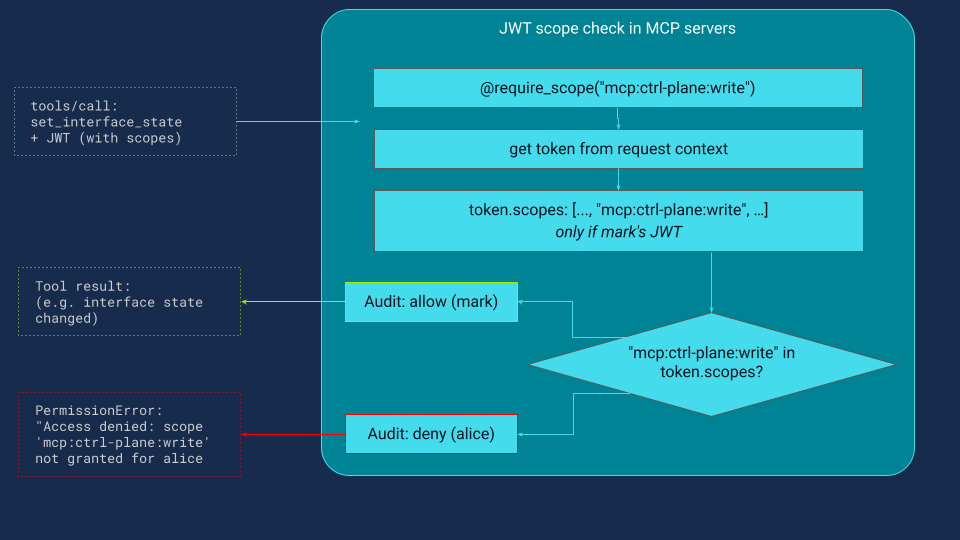
Fig.3: Call-time authorization with @require_scope.
Scope-filtered tool discovery: controlling what the agent can see
Call-time enforcement is necessary, but it is reactive. There is an earlier place to enforce authorization: tool discovery.
When an AI agent or application starts a session, it calls tools/list on each MCP server to learn what tools are available. The response is a list of tool descriptions designed to be understood by both LLMs and humans. This is the agent tool vocabulary. Each tool entry in the tools/list response includes a name, description, and schema (as in the example below):
{
  "name": "set_interface_state",
  "description": "Set a network interface administratively up or down.",
  "inputSchema": {
    "type": "object",
    "properties": {
      "device": {"type": "string"},
      "interface": {"type": "string"},
      "state": {"type": "string", "enum": ["up", "down"]}
    },
    "required": ["device", "interface", "state"]
  }
}
The LLM reads this description and understands: can bring interfaces up or down on network devices. This is exactly the information that determines whether the agent will attempt a write operation. If this tool appears in the list, the agent has it in its vocabulary and may use it when it reasons that an interface needs to be toggled.
There are two fundamental approaches: expose all tools versus filtered tools
Approach 1: expose all tools, rely on call-time denial.
The MCP server returns every registered tool regardless of the caller's scopes. The agent sees the full vocabulary, including read, probe, and write tools. If alice asks to bring down a loopback, the agent may attempt the write tool, then receive a permission error. This works, but it has drawbacks:
- The agent wastes a reasoning cycle on a tool it was never allowed to call.
- Denial messages may leak information about tool existence and scope vocabulary, so alice sees "Access denied: scope 'mcp:ctrl-plane:write' not granted".
- Prompt injection attempts can more easily reference sensitive tools when they are visible in the tool list
Approach 2: filter tools by scope at discovery time.
The MCP server inspects the caller's JWT before returning the tool list and removes any tool whose required scope is not present in the token.
Because we’re building our MCP servers with FastMCP, we leaned on its built-in middleware pipeline and implemented ScopeFilterMiddleware using the supported fastmcp.server.middleware APIs. The middleware inspects each caller’s JWT scopes and returns only the tools that the caller is authorized to use—no custom protocol parsing, and no tool-by-tool checks scattered across handlers.
class ScopeFilterMiddleware(Middleware):

    def _get_scope(self, tool: Tool) -> str:
        return getattr(tool.fn, "_required_scope", self._default_scope)

    async def on_list_tools(self, context, call_next):
        tools = await call_next(context)
        token = get_access_token()
        user_scopes = set(token.mcp_scopes)
        return [t for t in tools if self._get_scope(t) in user_scopes]
In Figure 4, two parallel tools/list requests from different users hit the same MCP server. As a result, alice (net-viewer) receives 12 read-only tools, while mark (net-admin) receives the full catalog of 47. The LangGraph agent is then initialized from this filtered tool set, so capabilities are constrained before any reasoning begins, and the LLM never even sees tools the user can’t execute.
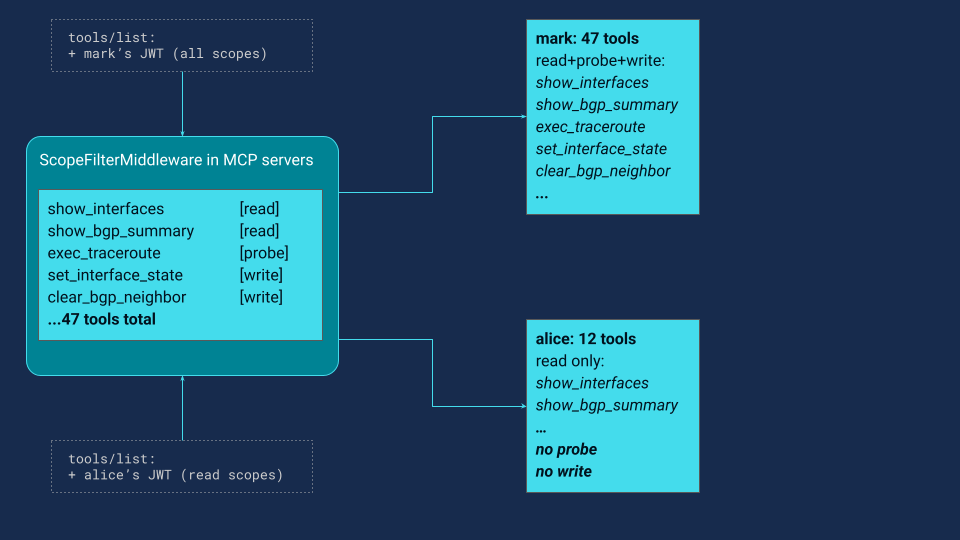
Fewer tools mean fewer capabilities, by design. With discovery time filtering, the MCP server returns only the tools whose required scopes are present in the user token, so the agent can only plan with what it is allowed to execute. Thus, alice cannot change the interface state because her agent never learns that write tools exist. When she asks for a write operation, the agent searches its permitted tool list, finds nothing that can change state, and responds that it does not have an authorized tool for that action. There is no failed call, no permission error in the chat, and no leaked tool names or scope strings.
This is the deliberate tradeoff: less capability is more security. The agent's power becomes proportional to the user's trust level. A net-viewer gets a read-focused agent, a net-operator gets a diagnostic agent with probe tools, and a net-admin gets a full operational agent including write tools. The LLM and prompts stay the same, but the tool vocabulary changes, which is what actually constrains what the agent can reason about and attempt.
Why both layers are required: defense in depth for MCP servers
Neither control is sufficient on its own. Discovery filtering without call time enforcement can be bypassed by an attacker who skips the agent and sends raw HTTP requests to the MCP server. If there is no runtime scope check, the server may execute a tool even though it was hidden from the tools list.
Call time enforcement without discovery filtering has a different failure mode. The agent still sees every tool, so it can waste cycles attempting actions that will be denied. Those denials can expose tool names and scope strings in user-visible errors, and the full tool catalog increases the prompt injection surface because sensitive tool names are present in the agent vocabulary.
Used together, the two layers provide defense in depth. Discovery filtering constrains what the agent can discover and plan with, while call time checks ensure the server only executes actions that the caller is authorized to perform.
When you cannot change MCP server code: Tool authorization on third-party servers
The require_scope decorator works when you control the MCP server code. In practice, some MCP servers are third-party binaries, containers, or managed services, so you cannot annotate tool functions. In those cases, you enforce per-tool authorization externally.
A common pattern is an MCP proxy or gateway in front of the server. It intercepts tool calls, validates the JWT, maps the tool name to the required scope using a policy file, and rejects calls when the scope is missing. A closely related pattern uses Open Policy Agent (OPA), where the proxy asks OPA for an allow or deny decision based on tool name, token claims, and policy. If the server framework supports middleware hooks, you can also enforce checks in middleware by inspecting the tool name and applying a scope mapping from configuration.
There are other variants in the same family, such as service mesh or ingress external authorization, but the details are out of this article scope. The key point here is simple: every tool call must be authorized against caller scopes, and that only works if the scopes arrive in a verifiable token from a trusted identity provider.
Production safeguards: TLS, short-lived tokens, and rate limiting
The controls described in this article focus on authentication and authorization at the MCP server boundary. These controls are essential, but they do not fully secure a production automation system. Real deployments should also include several operational safeguards that protect the infrastructure surrounding MCP servers.
First, MCP endpoints should always use transport security. All communication with MCP servers should be served over HTTPS using TLS to protect tokens and request data from interception or modification during transit. Encrypting API traffic is a baseline practice for protecting credentials and sensitive data.
Second, systems should use short-lived access tokens. Limiting token lifetime reduces the impact of token leakage because a stolen token can only be used for a short time before it expires.
Finally, production systems should implement rate limiting or request throttling. Autonomous agents may generate bursts of tool calls while reasoning about tasks, and without limits, this behavior can overload infrastructure or enable denial-of-service attacks.
These operational safeguards are important for production deployments but operate at the infrastructure and API-management layer rather than inside the MCP tool authorization itself. For that reason, they are acknowledged here but are outside the scope of this article.
Limits of scope-based security: tool design and shared credentials
Scope-based access control is only as strong as the tool design. Consider a dangerous tool:
@mcp.tool
@require_scope("mcp:ctrl-plane:read")
def run_raw_command(device: str, command: str) -> str:
    """Run any CLI command on a device."""
    return ssh_to_device(device, command)
A net-viewer has mcp:ctrl-plane:read. This tool passes the scope check. But the tool accepts an arbitrary command string, which means alice can effectively run configure terminal on a router just by asking for it. The scope model is bypassed entirely by the tool's own interface.
This is not a flaw in the authentication or scope system — it is a flaw in tool design. Well-designed tools are specific: get_bgp_summary(device), push_bgp_neighbor(device, asn, neighbor), run_ping(source, destination). Each does exactly one thing, and its scope requirement accurately reflects the risk of that one thing.
If a tool accepts a free-form command string passed directly to a device, it cannot be meaningfully secured by scope alone. Tool granularity is a prerequisite for scope-based access control to work.
Even with correctly scoped tools, the MCP server boundary is not enough. MCP servers must also be secured when connecting to network devices and executing tool commands, a topic covered in the next part of this series.
Key takeaways: securing MCP servers for network automation
This article introduced a practical security model for MCP servers used in agent-driven network automation.
The model adds an identity provider-backed authentication layer and consistent authorization at the MCP server boundary. Every request carries a verified identity, permissions are represented as scope strings grouped into roles, and authorization is enforced both when tools are discovered and when they are executed.
Discovery filtering constrains the agent’s reasoning space, while call-time checks guarantee that only authorized operations run.
These controls mitigate many of the risks introduced by autonomous agents interacting with infrastructure systems.
However, two important gaps remain: unsafe tool design and shared device credentials. Part 3 will address these issues by extending identity and authorization to the network device layer.
References
- Part 1: Six MCP security gaps when AI tools access network infrastructure
- MCP Specification 2025-11-15— Authorization

- RFC 9728 — OAuth 2.0 Protected Resource Metadata
- FastMCP — Python MCP Server Framework
- Keycloak — Open Source Identity and Access Management
- LangGraph — Agent Orchestration Framework