


This article is the third in a series on securing AI agents and MCP servers for network infrastructure.
Part 1 identified six security gaps common to MCP deployments on network devices.
This article addresses what comes after the tool call: how to replace shared SSH credentials with just-in-time certificates, enforce command-level restrictions directly on network devices, and maintain a correlated audit trail across the full request chain.
Where MCP tool-level security ends — and what it leaves exposed
Part 2 secured the boundary between the AI agent and the MCP server. Every tool call required a verified JWT, scope decorators enforced permissions before the tool code ran, and tool discovery was filtered by scope. That closed the front door. But one boundary was still open: the connection from the MCP server to the devices it manages.
In that design, the MCP server still logged into routers and switches with a shared service account. Whether a request came from a read-only viewer or a full administrator, the device saw the same SSH user. The device had no way to tell who originally triggered the command, what role they held, or whether they should have been allowed to run it.
This article closes that gap with three patterns:
- short-lived SSH certificates issued per tool call
- device-side command validation with ForceCommand
- centralized TACACS+ authorization for per-role command rules
The examples use the Net-Inspector demo system, but the pattern applies to any MCP-based architecture that drives infrastructure through SSH. Figure 1 extends the Part 2 architecture with the components this article introduces: an SSH CA (OpenBao) that issues just-in-time certificates, ForceCommand validators that enforce per-role command rules on each device, and a TACACS+ Server (tac_plus-ng).
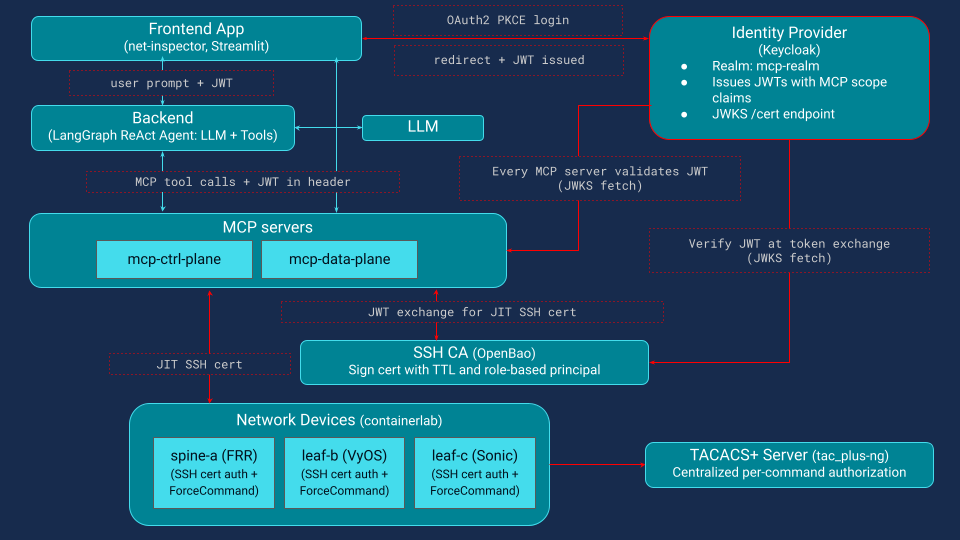
Why shared SSH credentials are a security risk in MCP-managed infrastructure
Most MCP deployments that talk to network devices still rely on a static SSH key or password stored on the MCP server. That credential may be protected, but it is still shared across every request.
This introduces three major issues that even the strictest MCP-layer scope enforcement cannot resolve:
- No user attribution. Device audit logs show "mcp-agent connected", not which human or agent session triggered the action.
- No privilege scoping. The SSH session has whatever permissions the shared key grants, typically full admin, regardless of the user's role.
- No temporal limits. The credential works indefinitely, so a compromised MCP server means permanent device access.
Even with correct scope checks on every tool, a single misconfiguration (a wrong scope string on a decorator, or a new tool added without a scope check) gives any authenticated user a path to arbitrary commands on the device. The MCP server becomes a wide-open SSH proxy.
Closing this gap requires two complementary patterns: per-user, time-limited credentials that replace the shared key, and device-side command validation that operates independently of the MCP server and the agent.
RBAC for network devices: mapping identity provider roles to local service accounts
Before diving into JIT certificates and ForceCommand, there is one design choice that makes both work cleanly: every network device exposes the same three local service accounts, aligned with the roles in the identity provider.
| Device account | IdP role | Purpose |
|---|---|---|
| net-viewer | net-viewer | Read-only queries |
| net-operator | net-operator | Queries and diagnostics |
| net-admin | net-admin | Full administrative access |
This is a practical RBAC pattern for infrastructure devices. Because the same three accounts exist on every device with the same names, device-side controls such as ForceCommand rules and TACACS+ command profiles can be applied consistently across the fleet. Onboarding a new user becomes an identity-provider change rather than a per-device operation. Onboarding a new device is also straightforward: create the same three local accounts, install the SSH CA public key, and configure the command validator.
With OpenSSH certificates, the CA is trusted through TrustedUserCAKeys, and the accepted principals for each local account are constrained through AuthorizedPrincipalsFile. That lets the certificate principal represent the role, while the local account preserves a stable device-side execution context.
The certificate can also carry per-session attribution in its Key ID, for example, the real username and session ID. In that model, the device can log both the effective role used for access and the originating user identity needed for audit correlation.
Defense in depth for MCP: separating tool-layer and device-layer authorization
Once the MCP server has verified the user’s JWT and the scope check has passed, the tool is allowed to run. But between an authorized MCP tool call and the command that actually executes on the device, there is still another security boundary to cross.
At the MCP layer, authorization is about intent: is this user allowed to call a tool such as show_bgp_summary? At the device layer, authorization is about execution: is the connected role allowed to run the actual CLI command? The agent sees a tool name; the device sees something like vtysh -c 'show bgp summary'. Each layer authorizes a different thing, and neither relies on the other.
After the scope check passes, the flow is (Figure 2):
Credential vending: requesting a JIT SSH certificate per tool call
The MCP server requests a short-lived SSH certificate from the SSH CA. The certificate principal reflects the user’s role, and its Key ID can embed the real username for audit correlation.
Device connection: verifying the certificate and mapping to a service account
The MCP server connects with that certificate. The device’s SSHD verifies it against the trusted CA and maps it to the appropriate local service account. OpenSSH supports certificate trust through TrustedUserCAKeys.
Command validation: intercepting and sanitising commands before execution
Before execution, the device intercepts the requested command, rejects interactive shells or unsafe shell metacharacters, and normalizes the command into a form suitable for authorization. With OpenSSH ForceCommand, the original client command is available through SSH_ORIGINAL_COMMAND.
Authorization decision: delegating to TACACS+ for per-role command rules
The sanitized command is evaluated against the permissions for that role, either locally or through a central service. In the demo, that decision is delegated to TACACS+, which is explicitly designed to authorize shell commands using service=shell and cmd.
Execution or denial: fail-closed by default, logged either way
If permitted, the command runs, and its output flows back through the MCP server to the user. If denied, execution stops. In both cases, the decision is logged for audit.
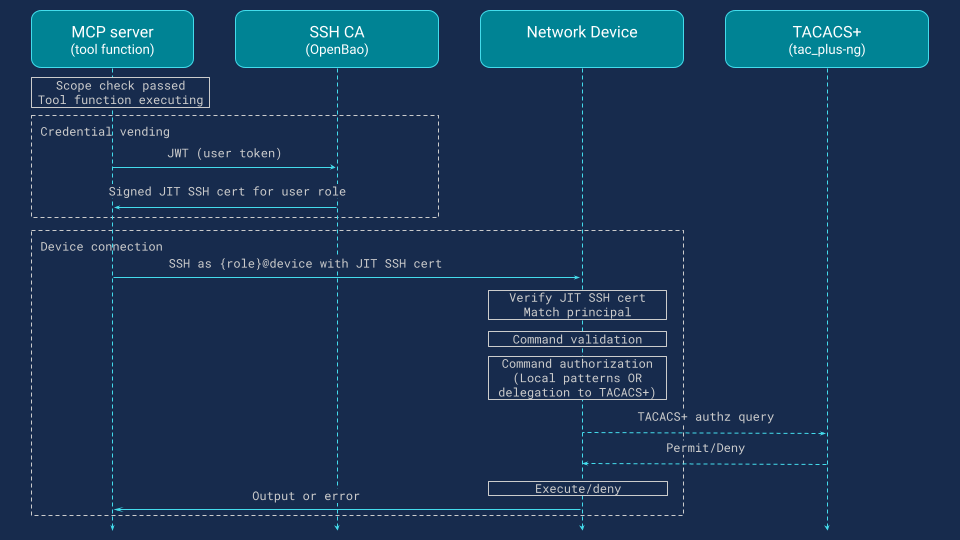
This separation is what makes the later defense-in-depth model work. A bad scope check in the MCP layer does not bypass command validation on the device, and a new CLI path added inside a tool still has to pass device-side authorization.
The next sections walk through each step in more detail.
Just-in-time SSH certificates: replacing static device credentials in MCP deployments
The core idea is just-in-time credential vending. Instead of storing long-lived device credentials in the MCP server, each tool call requests a short-lived credential scoped to the user’s identity and role. When the tool finishes, the credential expires. There are no static keys to store, rotate, or revoke.
Two services participate in this pattern.:
- The MCP server (credential consumer) holds the user’s JWT from the identity provider. For each tool call it exchanges that JWT for a short-lived SSH certificate, generates an ephemeral keypair in memory, and uses the signed certificate to connect to the device.
- The SSH CA (credential issuer) validates the JWT using the identity provider’s public keys, maps the user’s role to an SSH signing policy, and issues a certificate with the appropriate principal and TTL. The CA never connects to devices itself.
In the demo, the SSH CA is OpenBao, the open-source fork of HashiCorp Vault. The same pattern works with HashiCorp Vault, CyberArk, or any secrets platform capable of issuing SSH certificates on demand.
Security properties of JIT SSH certificates vs static keys
Using JIT SSH certificates instead of static keys improves security in several ways:
- Per-user attribution. The certificate principal represents the role (for example, net-operator), while the Key ID embeds the identity provider username. Device logs record the real user rather than a shared service account.
- Time-limited. Each certificate has a 60-second TTL, so a leaked credential quickly becomes useless.
- Revocable by omission. If a user’s session is revoked at the identity provider, the secrets engine simply stops issuing certificates.
- In-memory only. The ephemeral keypair exists only in memory and is never written to disk.
How the JIT certificate exchange works: step by step
When a tool executes, the MCP server sends the user’s JWT to the SSH CA authentication backend. The CA verifies the token using the identity provider’s JWKS keys and maps the net_role claim to an identity group that grants access to a specific SSH signing policy.
The MCP server then generates an ephemeral Ed25519 keypair in memory and submits the public key for signing. The CA returns a standard OpenSSH certificate with the user’s role as principal, a 60-second TTL, and a Key ID that embeds the identity provider username and session ID for audit correlation.
Example certificate issued in the demo system for bob (net-operator):
Type: ssh-ed25519-cert-v01@openssh.com user certificate
Serial: 15800344769086219675
Key ID: "sid=fd9e4bdc77df2fa8,user=bob"
Valid: from 2026-02-10T12:49:55 to 2026-02-10T12:50:55   ← 60 seconds
Principals: net-operator
Extensions: permit-pty
The MCP server connects to the device using this certificate. The device’s sshd verifies it against the trusted CA, maps the principal to the corresponding service account, and passes the command to the ForceCommand validator. When the tool completes, the in-memory keypair is discarded. Nothing is written to disk and no credential persists beyond the request.
Minimal configuration required per component
Each component requires minimal configuration.
MCP server. Only the SSH CA endpoint is needed. No device credentials or key files are stored. The JWT exchange, key generation, and signing logic are implemented in a shared library used by all MCP instances.
SSH CA. The CA requires a JWT authentication backend pointing to the identity provider’s JWKS endpoint, one SSH signing role per IdP role, and a policy granting access to the corresponding signing path. The net_role claim maps to an identity group so each user can request certificates only for their own role.
| Role | Identity Group | Signing Policy | Principal | TTL | Max TTL |
|---|---|---|---|---|---|
| net-viewer | net-viewer | ssh-net-viewer | net-viewer | 60 sec | 60 sec |
| net-operator | net-operator | ssh-net-operator | net-operator | 60 sec | 60 sec |
| net-admin | net-admin | ssh-net-admin | net-admin | 60 sec | 60 sec |
Network devices. Devices use standard OpenSSH configuration: the CA public key is installed as a trusted user CA, each service account has its own principals file, and ForceCommand is enabled for MCP accounts. This enforces strict role separation.
Threat model: what JIT credential vending eliminates
This architecture eliminates several classes of risk summarized in the following table.
| Security Concern | Mitigation Strategy |
|---|---|
| Stolen credentials | Keypairs exist in memory for the duration of a single tool call. No key files on disk, no credentials in config files, no secrets to leak from a compromised MCP server. |
| Credential reuse | A leaked certificate is valid for at most 60 seconds and scoped to a single role. An attacker who intercepts it gains limited access that expires automatically. |
| Credential rotation | Certificates expire without any action. No rotation schedule, no revocation lists to distribute across devices. |
| Shared identity | The Key ID embeds the identity provider username and session ID. Device logs trace every command back to the original user, even though the SSH connection uses a shared service account. |
| Stale access | Revoking a user at the identity provider immediately stops new certificate issuance. No need to update authorized_keys or push config changes to devices. |
| CA compromise via MCP server | The SSH CA validates identity and issues credentials. The MCP server uses them. Neither stores the other's secrets. Compromising the MCP server does not compromise the CA's signing key. |
SSH ForceCommand for MCP: device-side command validation and injection prevention
Once the MCP server holds a signed certificate, it connects to the device over SSH. The device verifies the certificate against the trusted CA public key and matches the certificate's principal to the corresponding local service account. If the principal is net-operator, the connection authenticates as the net-operator account.
At this point, OpenSSH's ForceCommand directive intercepts the incoming command before the shell sees it. ForceCommand is an sshd_config feature that replaces normal command execution with a validator script. When sshd receives a command on the exec channel (ssh {role}@device "show bgp summary"), it sets SSH_ORIGINAL_COMMAND and runs the validator instead. The validator performs three checks in sequence.
Stage 1: Input validation — blocking shell injection and unsafe metacharacters
First, it rejects interactive shell attempts (empty command) and validates that the command contains only characters from a strict allowlist. This is where command injection is blocked. Consider a malicious or hallucinated command: vtysh -c 'show bgp summary; rm -rf /'. The semicolon is not in the allowlist ([a-zA-Z0-9 _./:,=@'-]), so the command is rejected before any authorization logic runs. The same applies to pipes, backticks, redirections, dollar signs, and other shell metacharacters.
Stage 2: Command normalisation — stripping vendor wrappers and path prefixes
Second, the validator normalizes the command by stripping vendor-specific wrappers (such as VyOS's vyatta-op-cmd-wrapper prefix) and extracting the base command name from any absolute path. This ensures that authorization rules match consistently regardless of how the device wraps commands internally.
Stage 3: Authorization — local pattern matching or TACACS+ delegation
Third, the validator makes the authorization decision. This can happen locally using pattern matching in the script, or by delegating to a centralized TACACS+ server. The demo delegates to tac_plus-ng so that authorization rules are defined once and enforced uniformly across all devices, including FRR and VyOS, which have no native TACACS+ support. The ForceCommand script acts as a TACACS+ client on their behalf.
If TACACS+ permits the command, the validator executes it and returns the output through the SSH channel back to the MCP server. If TACACS+ denies it, or if the TACACS+ server is unreachable, the command is denied (fail-closed). Every decision, permit or deny, is logged with the user identity, role, certificate serial, and command, both locally and forwarded to the centralized observability stack.
ForceCommand compatibility: supported devices and alternatives for non-OpenSSH servers
ForceCommand is an OpenSSH directive, not part of the SSH protocol specification (RFC 4254). Dropbear and some commercial SSH servers do not support it. In practice, the vast majority of Linux-based network devices (FRR, VyOS, SONiC, Cumulus, Arista EOS) ship with OpenSSH, so ForceCommand is widely available. For devices with a non-OpenSSH server, alternatives include native TACACS+ support (if available), model-driven interfaces like NETCONF/NACM or gNMI (discussed later), or a custom wrapper script replicating the same pattern.
ForceCommand validator: the three-stage script deployed on every device
The script deployed on every device handles input validation locally and delegates authorization to TACACS+. The key parts:
ForceCommand validator (deployed on every device):

  COMMAND ← SSH_ORIGINAL_COMMAND
  ROLE    ← connecting username (= certificate principal)

  ── Stage 1: Input validation (local, no network calls) ──

  if COMMAND is empty → DENY "interactive shell not permitted"
  if COMMAND contains characters outside [a-zA-Z0-9 _./:,=@'-]
      → DENY "disallowed characters"
        (blocks semicolons, pipes, backticks, redirections, dollar signs)

  ── Stage 2: Normalization ──

  strip vendor-specific wrapper prefix (e.g. VyOS vyatta-op-cmd-wrapper)
  extract base command name from any absolute path
      e.g. /usr/local/bin/show → show

  ── Stage 3: Authorization ──

  query TACACS+ server with (ROLE, base command, args,
      audit context: mcp_user, cert_serial, keycloak_sid, request_id)

  if TACACS+ returns PERMIT  → execute normalized command, return output
  if TACACS+ returns DENY    → DENY "command not authorized"
  if TACACS+ is unreachable  → DENY "fail-closed"

  ── Logging ──
  every decision (PERMIT or DENY) is logged with full audit context
  to local file and forwarded to centralized syslog
TACACS+ server configuration: per-role command profiles with tac_plus-ng
A single configuration file defines authorization profiles for all roles. Deny rules are evaluated first, then permits, with a default deny at the end. The profiles use regex patterns with (^|/) prefix to match both bare commands and full-path variants:
profile viewer-profile {     # priv-lvl 1: read-only
    if (cmd =~ /configure/) deny
    if (cmd =~ /write/) deny
    if (cmd =~ /(^|\/)show($| )/) permit
    if (cmd =~ /(^|\/)ip route($| )/) permit
    if (cmd =~ /(^|\/)ip addr($| )/) permit
    deny
}

profile operator-profile {   # priv-lvl 7: read + diagnostics
    if (cmd =~ /configure/) deny
    if (cmd =~ /write/) deny
    if (cmd =~ /(^|\/)show($| )/) permit
    if (cmd =~ /(^|\/)ping($| )/) permit
    if (cmd =~ /(^|\/)traceroute($| )/) permit
    if (cmd =~ /(^|\/)ip($| )/) permit
    deny
}

profile admin-profile {      # priv-lvl 15: unrestricted
    permit
}
Because all devices delegate to the same tac_plus-ng instance, updating a profile immediately changes what every device enforces. There is no per-device policy to maintain and no risk of drift between devices.
What happens when MCP authorization fails: defense in depth at the device layer
The biggest threat in this architecture is not a failed login. It is a tool that turns the MCP server into a generic SSH proxy. A raw command tool like the one below is an anti-pattern and should not exist in a production design:
@mcp.tool
@require_scope("mcp:ctrl-plane:read")   # BUG: should be mcp:ctrl-plane:write
def run_raw_command_on_device(device: str, command: str) -> str:
    """Run a raw CLI command on a network device."""
    return execute_ssh_command(device, command)) -> str:
Because of the bad scope, Bob (net-operator) is allowed to call the tool. The MCP server does the right thing for Bob’s role: it gets a JIT certificate with the net-operator principal and connects to the device. But when the tool tries to send a configuration command, the device-side validator intercepts it, and TACACS+ denies it:
2026-02-07T12:34:56+00:00 [net-operator/bob/cert:15800.../sid:fd9e.../req:a1b2c3] DENY (TACACS+): vtysh -c 'configure terminal'
So the MCP-layer bug does not become a device change.
That is the point of the design. A command succeeds only when every layer allows it: the tool scope, the user’s JWT, the SSH certificate role, and the device-side authorization policy. If one layer is wrong, the others still have a chance to stop it.
End-to-end audit trail for AI agent commands: correlating logs across MCP, SSH CA, and network devices
One of the security gaps identified in Part 1 was audit trail fragmentation: with shared credentials, device logs show "mcp-agent" instead of the real user. This is a compliance problem as much as a security one. Frameworks including SOC 2, ISO 27001, and network change management standards require that every privileged command on infrastructure be attributable to a specific individual, not a shared service account. JIT certificates and environment variable propagation solve this by carrying the user's identity across every component in the chain.
Four correlation IDs make this possible: the identity provider username (keycloak_user), the login session ID (keycloak_sid), the certificate serial number (cert_serial), and a per-tool-call request ID (request_id). The certificate's Key ID embeds the first two at signing time, and the MCP server passes the username and request ID to the device as SSH environment variables. Together, these IDs appear in every audit log along the path, allowing any entry to be traced back to the original user and session.
Here is what the audit trail looks like when bob asks the agent "show bgp status on spine-a":
| Component | Audit log entry (crucial parts) | Correlation IDs |
|---|---|---|
| IdP | LOGIN userId=bob sessionId=fd9e4bdc... | user, sid |
| AI agent | user=bob sid=fd9e4bdc... tool=show_bgp_summary args="spine-a" | user, sid |
| SSH CA | user=bob path=sign/net-operator serial=15800... | user, cert serial |
| MCP server | keycloak_user=bob sid=fd9e4bdc... serial=15800... request_id=a1b2c3 | user, sid, cert serial, request ID |
| Device sshd | net-operator cert ID "sid=fd9e4bdc...,user=bob" serial 15800... | user, sid, cert serial |
| ForceCommand | [net-operator/bob/cert:15800.../sid:fd9e.../req:a1b2c3] PERMIT | user, sid, cert serial, request ID |
| TACACS+ | user=net-operator decision=PERMIT rem_addr=bob/cert:15800.../sid:fd9e.../req:a1b2c3 | user, sid, cert serial, request ID |
Each component logs independently, and the logs live in different places: identity provider writes to its own database, the SSH CA has a JSON audit file, device sshd uses the AUTH syslog facility, the ForceCommand script writes to a local file, and TACACS+ has its own accounting log. In a production deployment, these scattered sources make correlation difficult unless they are aggregated.
In the demo, all audit logs are collected into a single Loki instance. Container logs (Keycloak, MCP servers, agent) are shipped via Promtail. Device-side logs (sshd, ForceCommand) are forwarded over UDP syslog to a syslog-ng collector, which writes them to Loki. TACACS+ accounting logs follow the same syslog path. With all sources in one place, a proper Loki query on any of the four correlation IDs reconstructs the full chain from user login to command execution across all components.
Operational tradeoffs: latency, availability, and policy drift in production deployments
This design is more secure, but it is not free.
Every tool call adds a token exchange and certificate-signing step before SSH begins. At a small scale, that overhead is modest. At a larger scale, you may choose to cache a short-lived cert for the lifetime of a session instead of minting one per command.
The secrets engine and TACACS+ server also become real dependencies. In the demo, the device fails-closed if TACACS+ is unreachable. That is the right security choice, but it means availability planning matters. These services need the same operational attention as any other control plane dependency.
There is also a distribution cost. Every device that accepts MCP-driven SSH needs the CA trust anchor and the validator script.
And one gap still remains: MCP scopes and TACACS+ command rules are complementary, but they are still maintained separately. They protect different layers, yet they can drift over time if policy changes are not coordinated. That is not a reason to avoid the design. It is the next problem to solve.
Beyond SSH: applying the same credential principles to NETCONF, RESTCONF, and gNMI
SSH is the focus of this article because it is still the most widely supported management interface across network devices. But when model-driven APIs are available, they usually provide stronger authorization models. NETCONF and RESTCONF can use NACM (RFC 8341) to enforce access rules on specific operations and data nodes. That is generally more robust than regex-based CLI filtering. RESTCONF also benefits from standard HTTP security mechanisms such as TLS and HTTP authentication. gNMI/gRPC follows the same general direction. It works with structured paths instead of free-form CLI commands, and many implementations support TLS client certificates or bearer tokens for authentication.
In practice, the right choice depends on what the customer’s network supports. Most production environments are mixed across vendors and device generations. SSH, NETCONF, RESTCONF, and gNMI often coexist. The JIT certificate pattern in this article is SSH-specific, but the broader design principle is not. Credentials should be per-user, short-lived, and scoped to the action being performed. In an SSH workflow, that means short-lived SSH certificates. In NETCONF or RESTCONF, it could mean ephemeral TLS client credentials. In gNMI, it may mean short-lived bearer tokens or client certificates. The transport changes, but the security architecture stays the same.
Summary: what this architecture gives you and what comes next
Part 2 secured access to MCP tools. This article is about securing what happens after the tool is called.
The design adds three controls:
- JIT SSH certificates instead of shared device credentials
- device-side command interception with ForceCommand
- centralized TACACS+ authorization for per-role command rules
Together, they change the MCP server’s role. It is no longer a privileged SSH proxy holding a static key. It becomes a broker that requests a short-lived credential, passes a role-scoped identity to the device, and submits commands to an enforcement layer the device controls.
That gives you four concrete benefits:
- real per-user attribution at the device boundary
- short-lived credentials instead of static secrets
- an independent enforcement point that catches upstream mistakes
- a correlated audit trail across the full request path
The remaining challenge is policy maintenance. MCP scopes and device command rules still live in different systems, which makes them harder to keep aligned over time. One practical way to mitigate this is to use OPA (Open Policy Agent) to centralize that logic, so policy can be defined, tested, and audited in one place. It can also help the MCP server move from simple role checks to attribute-based access control, limiting access to devices by tenant, site, city, or other inventory attributes. This is a strong direction for future work, especially for teams that want more consistent and scalable policy enforcement across network infrastructure.
References
- Part 1: Six MCP security gaps when AI tools access network infrastructure
- Part 2: MCP server security: JWT authentication, scope-based authorization, and tool-level access control for network automation
- OpenBao — Open Source Secrets Management

- OpenSSH Certificate Authentication
- ForceCommand — OpenSSH sshd_config
- TACACS+ — RFC 8907
- SONiC bash_tacplus — Per-Command Authorization
- Paramiko — SSH2 Protocol for Python
- NETCONF — RFC 6241
- NACM — RFC 8341 (NETCONF Access Control Model)
- RESTCONF — RFC 8040
- gNMI Specification